Connectivity Guide
Depending on your infrastructure, you might need to allow domain names and/or IP addresses and ports in your network configurations in order to be able to access the services Famoco provides. For example, private networks (Wi-Fi or Cellular), which heavily restrict the access to the internet, may impeach you to use Famoco's features on your devices or web browsers.
You will find below a guide to all domains or IP addresses (and ports) to whitelist, if you find yourself in that situation.
Network Policies
Core Services
The following list of services is mandatory for our core features:
| Service | Application Protocol | Transport Protocol | Domain | Reason |
|---|---|---|---|---|
| MDM Server | HTTPS | 443/TCP | mdm.famoco.com |
MDM - Browser Access |
| My Famoco Server | HTTPS | 443/TCP | my.famoco.com |
MDM - Browser Access (+ Device Sync for old devices) |
| Sync Server | HTTPS | 443/TCP | sync.famoco.com |
Devices - Sync with the MDM |
| Static Server | HTTPS HTTP |
443/TCP 80/TCP |
static.famoco.com |
Devices - Important connectivity check on devices |
| OTA Server | HTTPS | 443/TCP | ota-manager.famoco.com |
Devices - Access to OTA Upgrades |
| Sentry Server | HTTPS | 443/TCP | mobile-logs.dev.famoco.com |
Devices - Error reporting for customer support |
| Telemetry Server | HTTPS | 4318/TCP | otlp.famoco.com |
Devices - Additional error reporting |
| Time Server | NTP | 123/UDP | time.famoco.com |
Devices - Date/Time configuration |
Regarding DNS
Devices need to do DNS resolutions, which means that 53/UDP and 53/TCP (application protocol: DNS) need to be open.
Add-on Services
The following list of services is recommended if you want a smoother experience with your devices or if you subscribe/have access to advanced MDM features:
| Service | Application Protocol | Transport Protocol | Domain | Reason |
|---|---|---|---|---|
| Remote Control Server | See note below | See note below | remote.famoco.com |
Remote Control - Browser/Device access |
| Insights Server | HTTPS | 443/TCP | insights.famoco.com |
Insights - Browser access |
| Collector Server | HTTPS | 443/TCP | collector-proxy.famoco.com |
Insights - Device access |
| Push Server | HTTPS | 443/TCP | push.famoco.com |
Device push actions and Campaigns |
| Alerting Server | HTTPS | 443/TCP | alerting.famoco.com |
Alerting - Browser access |
| Bugreport Server | HTTPS | 443/TCP | bug-reports.famoco.com |
Bugreports - Device access |
| Open Street Map | HTTPS | 443/TCP | *.openstreetmap.org |
Maps - Browser access |
| Location Server | HTTPS | 443/TCP | location.famoco.com |
Network Location - Device access |
| SUPL | SUPL | 7275/TCP | supl.famoco.com |
GPS Location (See note below) - Device access |
| EPO | HTTPS | 443/TCP | epo.famoco.com |
GPS Location (See note below) - Device access |
| PayG Server | HTTPS | 443/TCP | payasyougo.famoco.com |
PayAsYouGo - Browser access |
| PayG Mobile | HTTPS | 443/TCP | mobile-payasyougo.famoco.com |
PayAsYouGo - Device access |
| Pushy Server | HTTPS MQTTS |
443/TCP 8883/MQTTS |
pushy.famoco.com |
Gamification - Browser/Device access |
Regarding Remote Control
- For the MDM browser access: 443/TCP
- For the communication between the device and the Remote Control Server: UDP ports between 10 000 and 10 500 (application protocol: RTP)
- For the STUN/TURN servers: 3478/UDP and 3478/TCP (application protocol: STUN)
Regarding SUPL/EPO
SUPL and EPO are highly recommended if you use GPS positioning:
- SUPL: Secure User Plane Location (SUPL) is a protocol used in mobile telecommunications networks to provide location-based services (LBS) to mobile devices.
- EPO: Extended Prediction Orbit (EPO) files allow GPS devices to predict where satellites will be in the sky, which reduces GPS acquisition time.
Optional
You may also get in touch with the Famoco support team for more domain whitelisting in order to improve APK distribution in poor network conditions and to get the "captive portal check" working properly.
Famoco Cloud Services
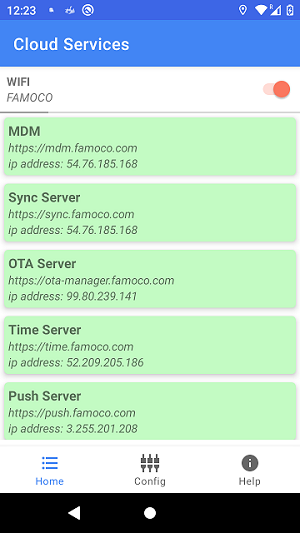
Famoco offers a Cloud Services app, allowing administrators to test these network policies and whether device connectivity to Famoco's services is working correctly before deploying devices and apps in the field.
You can download the app from here: cloud-services-app.1.1.0.apk.
The application indicates whether the domain name has been correctly whitelisted, enabling the device to effectively connect to Famoco's servers.
This application uses the Application Configurations feature to receive the network policies to check. Depending on how many services you want to check, please pick one of the following three configuration files and add them to your Profiles, along with the application found above.
-
All Services
-
Core Services
-
Add-on Services
IP addresses
If you prefer to allow IP addresses explicitly, here is a list of all IPs to be whitelisted.
Warning
If you select this method, please be warned that since we do regular IP rotations, specific ports need to be opened on all IP addresses, in addition to the usual ones, in order for specific features to function.
Please follow all of the Application and Transport protocol recommendations seen in the "Network Policies" section.
Current IP addresses
- 3.248.128.104
- 18.200.106.60
- 34.249.79.180
- 34.252.112.209
- 34.254.143.72
- 52.209.205.186
- 52.31.71.248
- 54.170.253.228
- 54.171.84.30
- 54.220.232.145
- 54.247.144.179
- 54.72.43.66
- 54.76.185.168
- 54.77.183.152
- 54.78.229.143
- 63.35.239.82
- 99.80.110.237
- 99.80.217.106
- 99.80.239.141
- 99.81.56.238
- 13.39.192.138
- 52.47.171.254
Future Additional IP Addresses
Info
If your network whitelists IP addresses, these additional IPs will be mandatory by the end of 2026.
- 185.19.28.100
- 185.19.28.139
- 185.19.28.207
- 185.19.28.238
- 185.19.29.65
- 185.19.29.96
- 185.19.30.118
- 185.19.31.36
- 159.100.241.36
- 159.100.241.128
- 159.100.241.151
- 159.100.241.172
- 159.100.240.12
- 159.100.240.42
- 159.100.240.72
- 159.100.240.111
- 159.100.240.140
- 159.100.240.145
- 159.100.240.162
- 159.100.240.184
Famoco Connect
If you wish to use Famoco Connect, there are additional IP ranges you need to whitelist.
- 158.177.93.16/28
- 185.228.69.0/24
- 185.228.70.0/24
- 3.69.121.60/32
- 3.69.192.150/32
- 3.64.84.111/32
- 3.73.220.0/32
- 3.69.113.129/32
- 18.194.252.193/32
- 45.128.112.248/29
- 45.128.113.248/29