Release Notes
MDM 3.7 (September 2026)
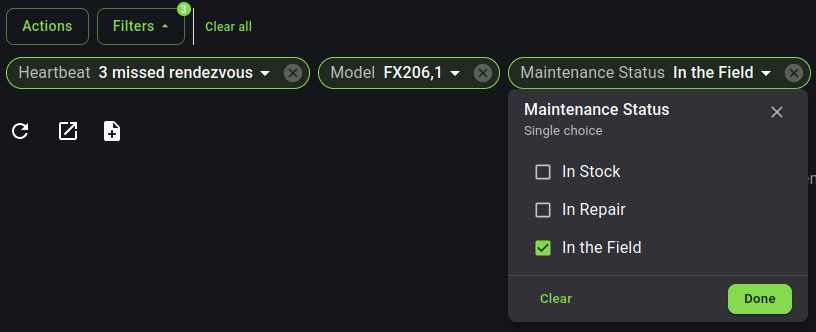
MDM Filters
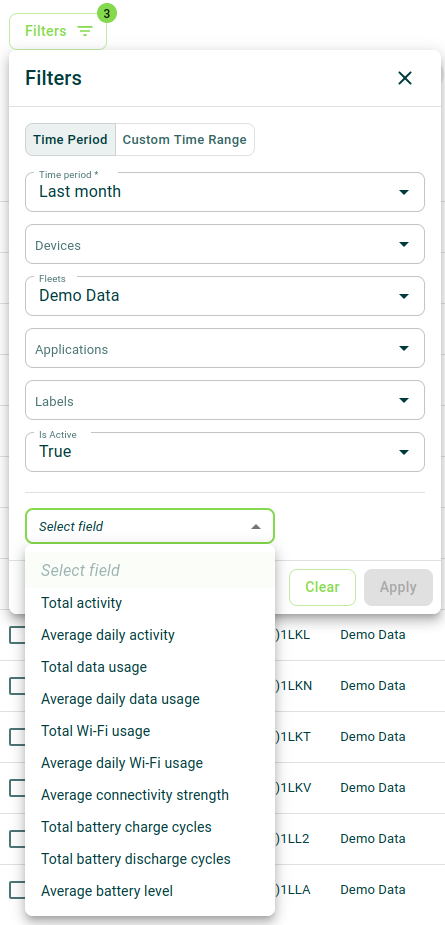
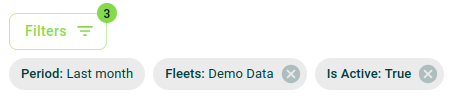
We have completely reworked filters on all MDM menus, in order to make them more efficient and fit better with the numerous redesigns the platform has had in the last year and a half (since version 3.0).
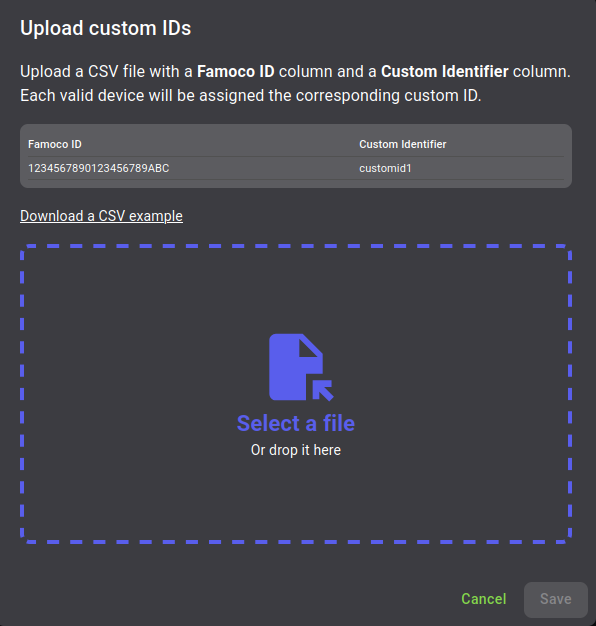
Custom Identification batch assignation
You may now edit many Custom IDs in one go, by uploading a CSV which matches Famoco IDs and Custom IDs.
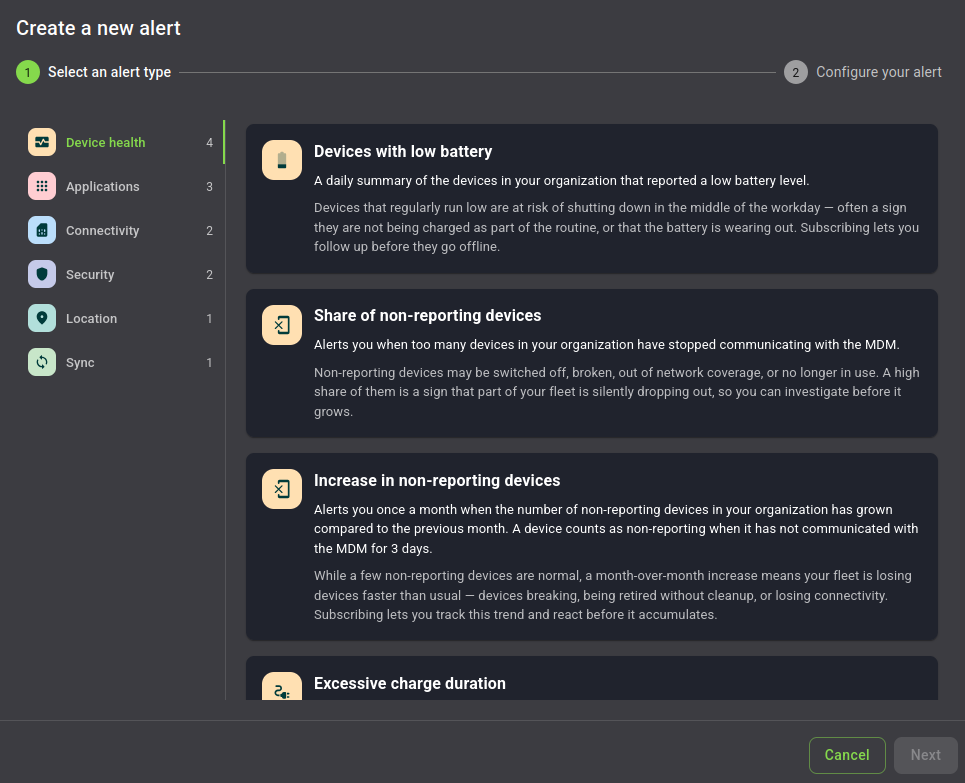
Alerting
- Continuing the redesign from last release, we've made sections clearer, in order to improve the navigation.
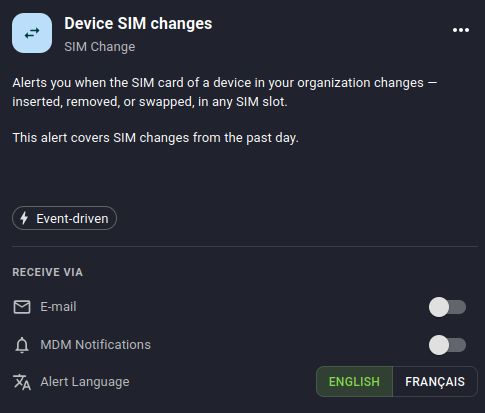
- A new Alert warns you whenever SIM cards have been inserted, replaced or swapped on your devices.
Improvements to User Interface and User Experience
On the Profile's menu:
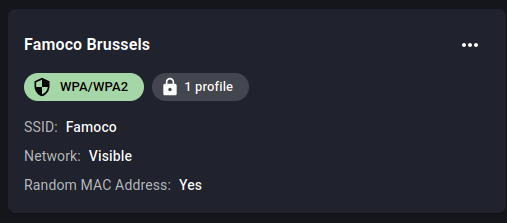
- You may now know which Wi-Fi configurations are still being used by Profiles before attempting to delete them.
On Insights' menu:
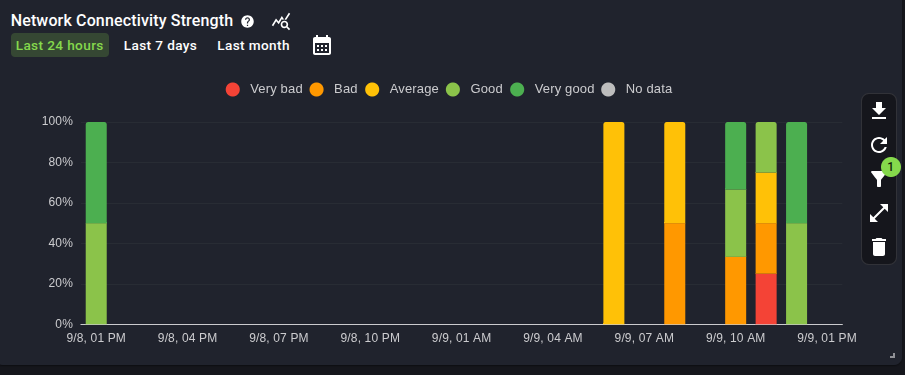
- Network Connectivity Strength chart now displays the percentage of devices per connectivity quality instead, of a count of devices.
On the Application's menu:
- You will now receive better feedback when uploading an application which already exists in your MDM Organization.
Smaller features
On the Device's menu:
- The status of your Famoco Connect provisioning (per device) is now displayable on the data table
- The state of voice, data and SMS activation on SIM cards is now displayed on the device side panel
- You may now filter devices by Wi-Fi MAC addresses
- Warranty data is now filterable and exportable
On the Alerting menu:
- The thresholds for some alerts were being calculated on all devices in your organizations, instead of only considering devices "in field" - this has now been fixed
And many bugfixes!
MDM 3.6 (August 2026)
Changes to Wi-Fi management
We've changed how Wi-Fi Configurations are handled in the MDM:
- Wi-Fi configurations now have a dedicated menu, in which you can manage all the different access points you may want to add to Profiles.
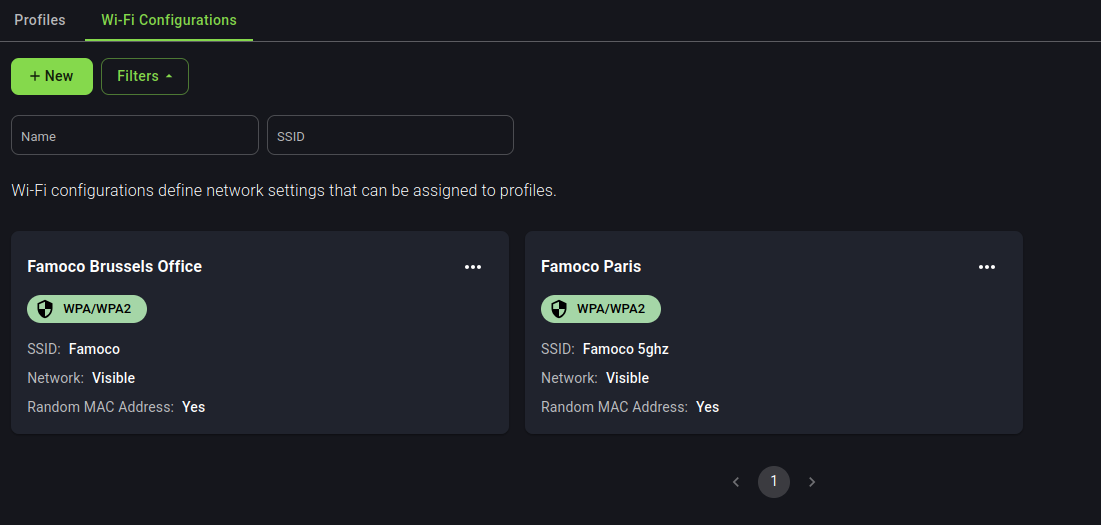
- Assign multiple Wi-Fi configurations on Profiles (this feature requires Famoco Layer version 3.27.0 or above)
If your devices are compatible with this feature, it is now possible to send multiple Wi-Fi configurations to the same device. This allows your devices to connect with different access points found at multiple places, without forcing you to change their Fleet and Profile based on their location.
For more information, please check our dedicated Wi-Fi management guide.
Improvements to User Interface and User Experience
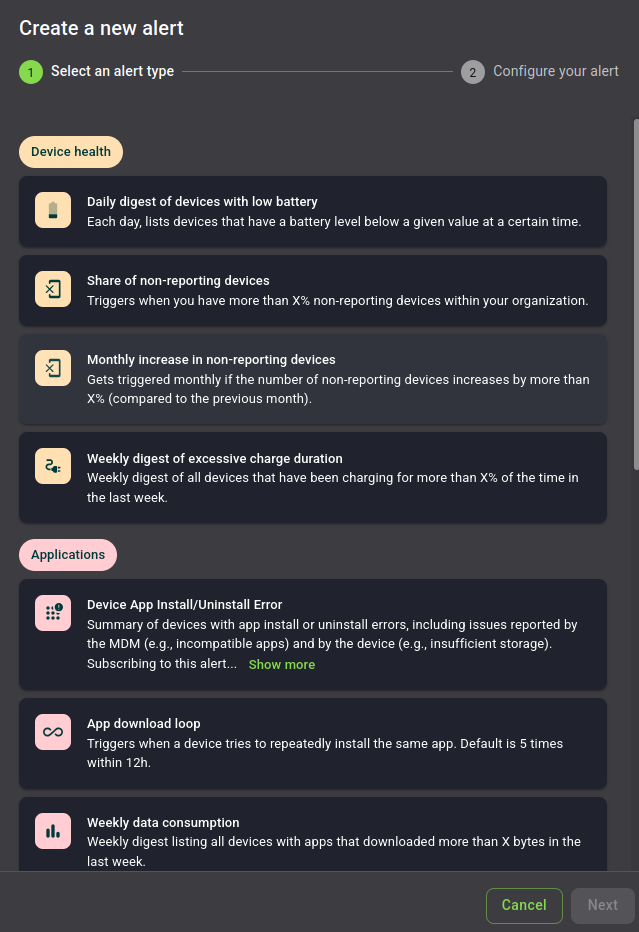
- The Alerting menu has been revamped, in order to be much more user-friendly and informative. Alerts are now grouped by types when being created, and both creation and subscription forms include distinguishable icons.
- Improvements to the Famoco Connect plans list (color codes allow you to know the status of your plans in one glance)

- Insights is now deployable on a per-profile basis, and without relying on Famoco's Support team.
-
Geozones are now assigned to Fleets instead of profiles, following customer feedback (as it ties much better with fleet deployment to specific geographical zones).
-
Whitelists are now enabled by default on newly created Profiles. You may still explicitly deactivate them if you really want to, but we highly recommend their usage.
Smaller features
On the Device's menu:
- Display which connectivity type was used during the last sync (requires Famoco Layer version 3.27.0 or above)
- The date at which the device first synced is now displayed (but might be inaccurate if the device first synced before May 2018)
- You may now keep, if you so desire, Custom IDs when moving devices across MDM organizations (the same way as it was possible before with Labels)
- Devices are now filterable by "OS Version"
- Famoco Connect-related values are now exportable
On the Application's menu:
- You may now add comments to applications you've uploaded (in order to keep track of changes between your business applications)
- Application Configurations are duplicable, allowing you create a new one based on previous data, and only changing a few values
- You may now track when Application Configurations were created and modified
On the Profile's menu:
- You may now restrict devices to only be used with SIM cards from specific networks. If a SIM card from a different network is inserted, the device will be locked. It will still be connected to the internet, but it will not be usable by the end-user.
On the API Access menu:
- You may now add labels to MDM API tokens, in order to be able to differentiate them by usage (e.g. "export-data", "upload-apks", etc)
MDM 3.5 (May 2026)
Famoco Connect provisioning
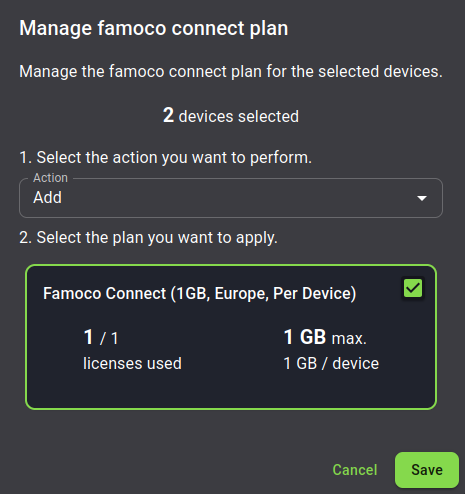
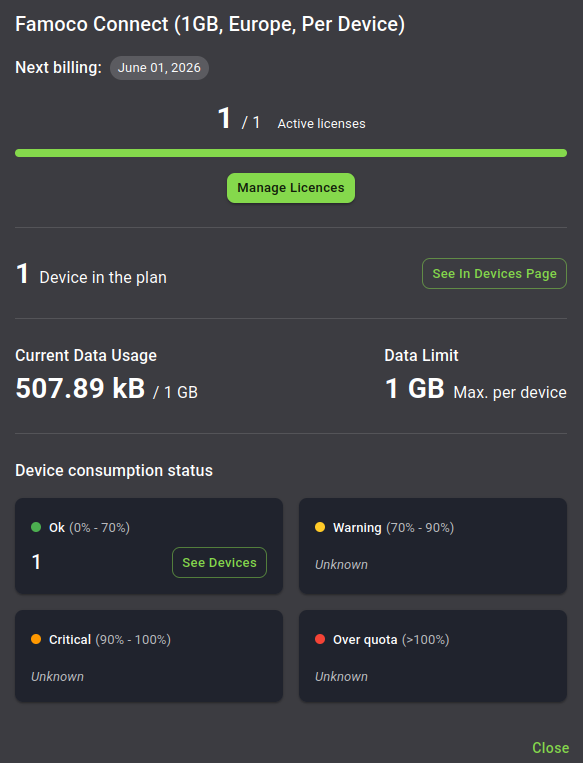
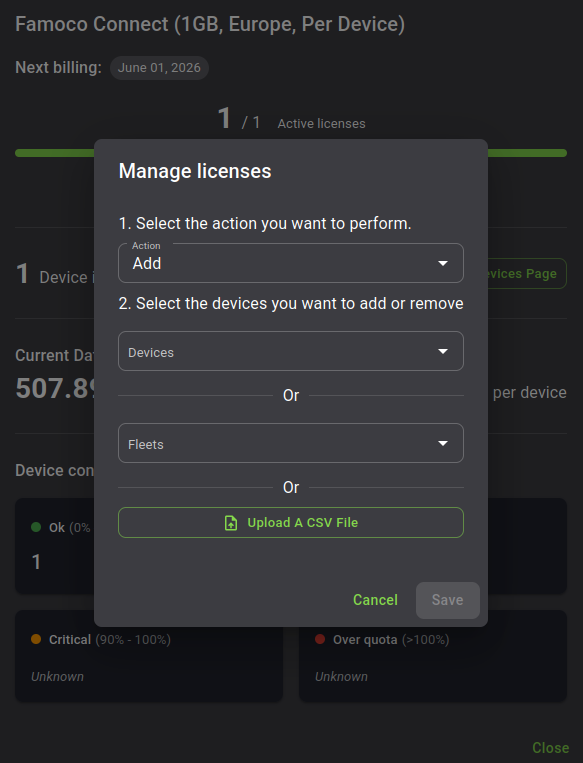
Previously, when subscribing to the Famoco Connect feature, you had to go through our support team in order to activate it on your devices.
It is now possible to activate the feature by yourself, inside of the MDM, either:
- with an action in the Device's table, after selecting devices
- or through the dedicated Famoco Connect menu
Info
There will be however a transitionary period in which the support team is still required, as the feature requires a recent image of the Famoco OS to be installed on your devices. Please contact them for more information.
Alerting
Two new Alerts are now available:
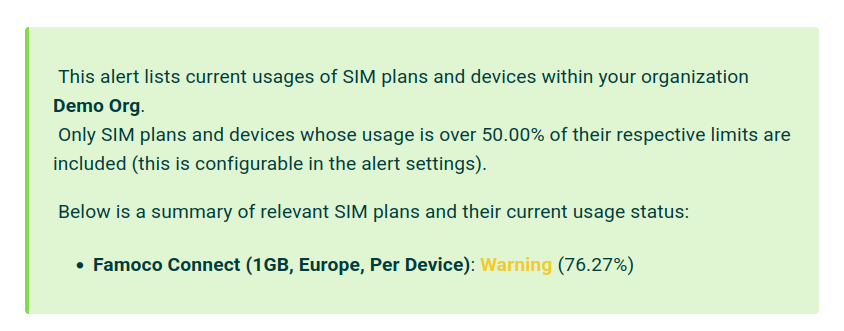
- Famoco Connect data limit
Get an email or MDM notification whenever your devices start consuming too much data on their Famoco Connect plan.
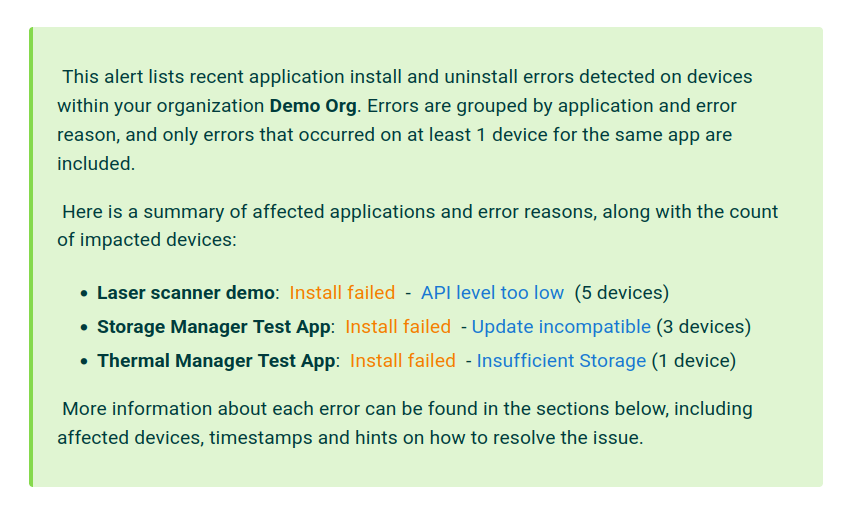
- Application issues
Get a lot more insight into issues happening on your devices due to applications failing to install or uninstall.
Improvements to User Interface and User Experience
- Insights dashboard editing
We've simplified the edition of Insights dashboards by making them directly editable on the fly. This means you don't need to modify your whole dashboard to check a few filter changes, you may edit anything you want and your dashboard will only be saved the moment you press the "Save" button.
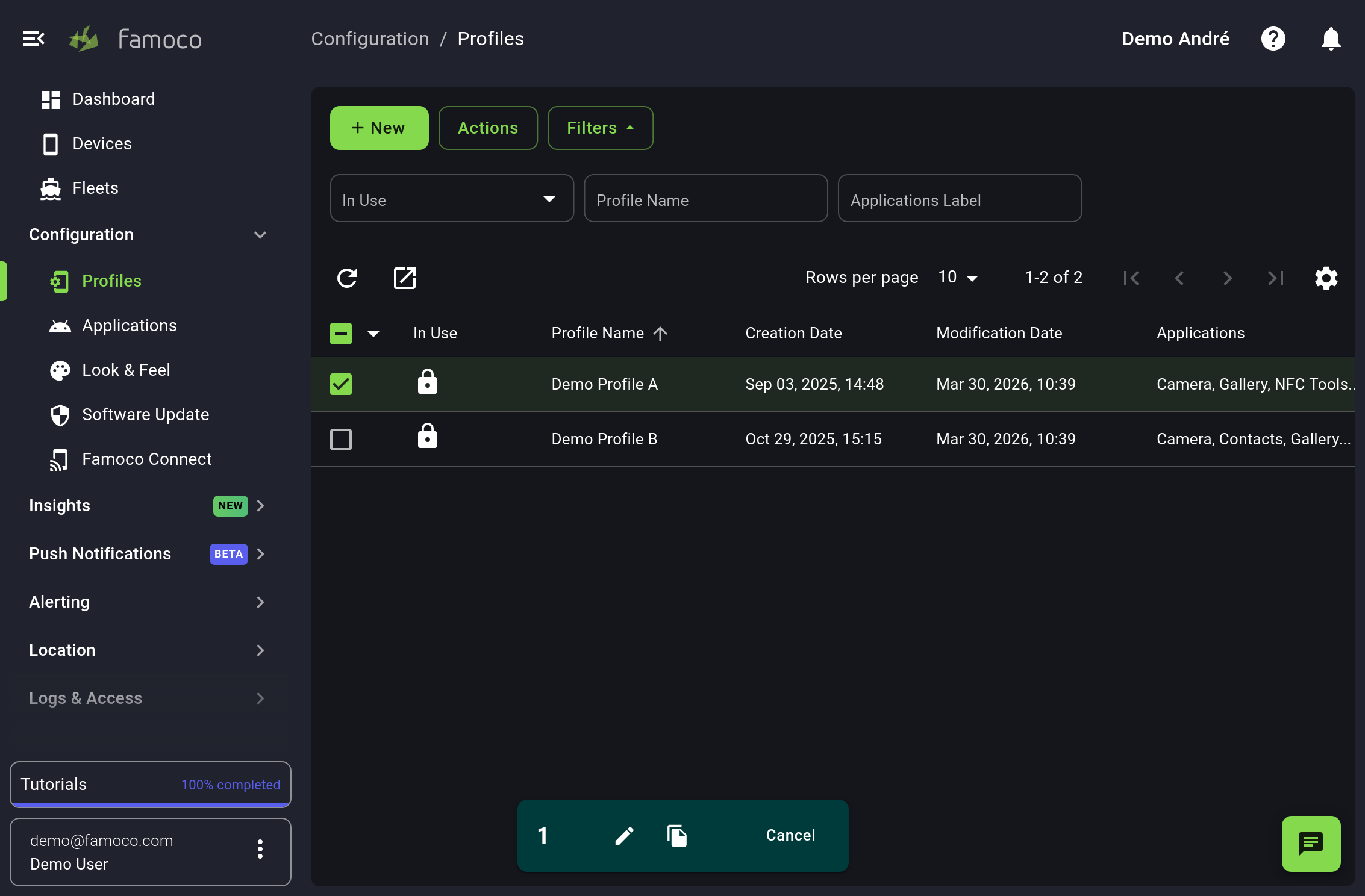
- Mobile friendly interface
The MDM is now a lot more usable through tablets and phones, for those situations when you need to apply changes on the go, away from a computer. Here is an example of the MDM running on a tablet.
- Remote Control redesign
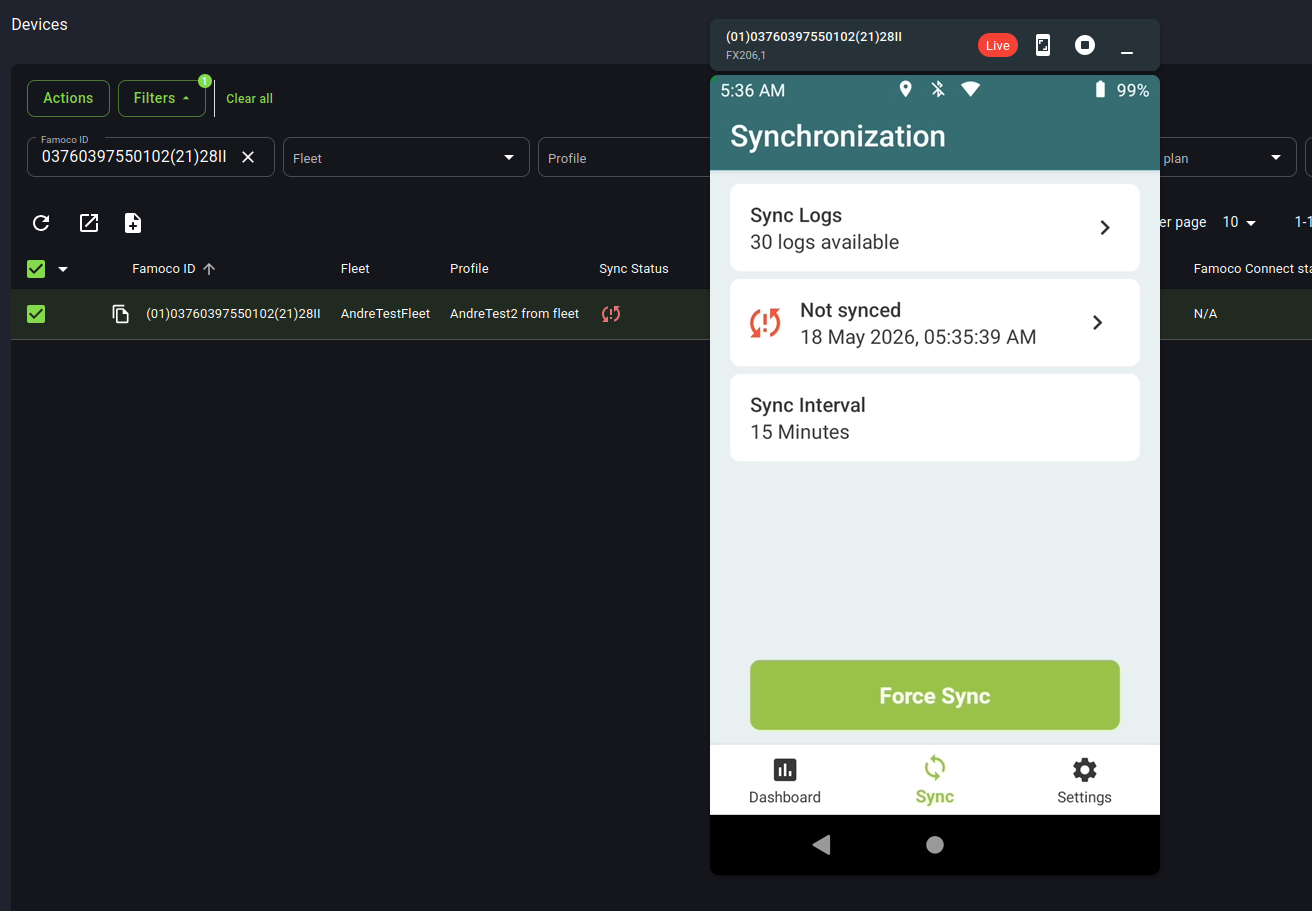
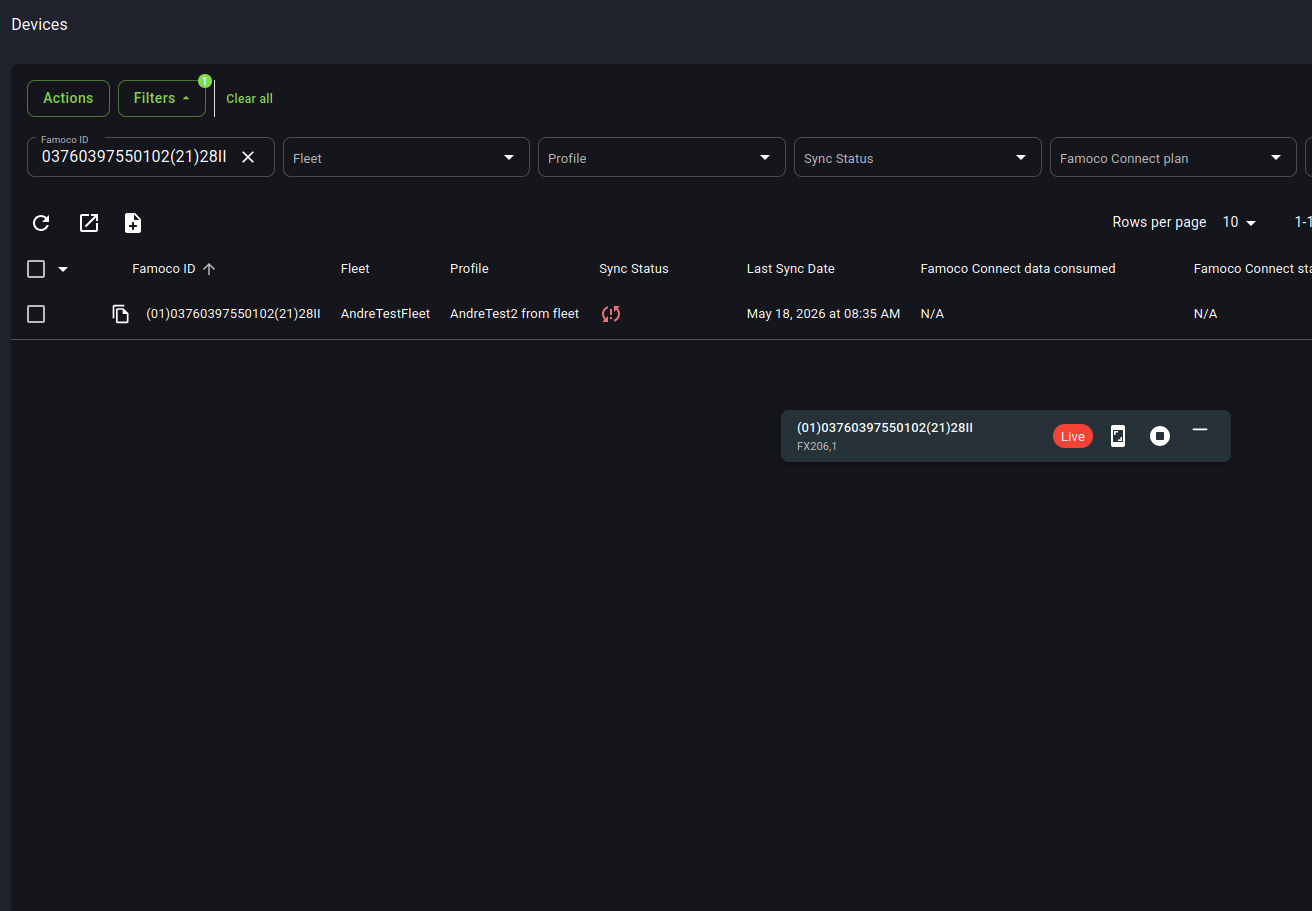
When using the Remote Control feature, the MDM page would restrict the user to the screen which controls the device. This would mean that if further changes needed to be applied on the MDM, users were forced to open a separate window in order to operate. We've redesigned this feature in order to be more usable, by adding the following things:
- it is now also possible to activate the feature from the actions bar in the device's table when selecting a single device, not only through the side panel of a device
- you may now move the window of your remote control session and even minimize it, in order to work on the MDM in parallel
- take screenshots of what's happening on the device by pressing a dedicated button
- Send campaigns directly from the Devices or Fleet tables
When selecting devices or fleets in their corresponding tables, you may now send a Push Notification to those devices directly, without having to go through the dedicated menu, by pressing the icon.
- Token information in Action Token file
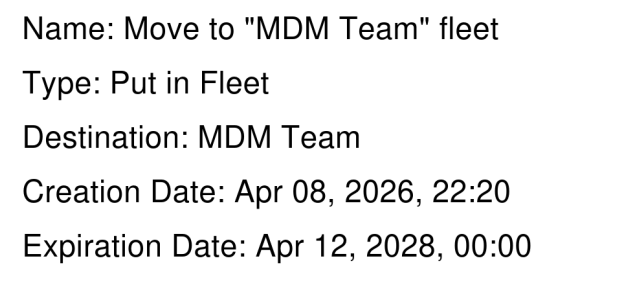
Pressing "download" on the side panel of an Action Token allows you to retrieve an image of the QR Code related to that token. However, we've received feedback from our users that it is often complicated to manage several Action Tokens in parallel, as there is no way to differentiate between them in their QR Code form.
We have now added more context in the image, displaying all information related to that specific Action Token along with the QR Code.
- Select from file
The "Select from file" feature, which has existed for a long time, was too hidden in the Device's menu, which made it relatively unknown by our users (albeit being very useful). It is now featured more prominently, above the table, next to the export button.

- Search devices by SIM ICCID
It is now possible to filter devices by SIM ICCID, in order to find which device contains a specific SIM card. You'll find it among the filters on the Device's table.
- Add comment to Fleets
Just as with many other objects in the MDM, it is now possible to add comments to Fleets.
- Software Update Policy schedules
Two new schedule types were added in the Software Update Policy form: "at next boot" and "at next day and next boot"
MDM 3.4 (January 2026)
Insights
We've redesigned how Insights Paid MDM Add-On works completely, in order to give its users a lot more flexibility.
- Improved data table: We've fused the data tables Insights provided, and the final result now exposes a lot more information and filters, allowing you to really understand in-depth all the available information about your devices. Check out the Discover page for more information.
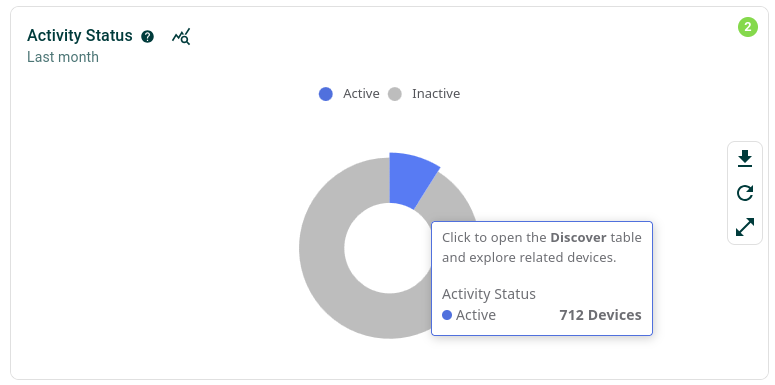
- Interactivity between charts and the data table: You may now interact with charts in order to assess the exact devices they are exposing. When clicking on key elements of most charts, you will be redirected to the Discover page with the same exact filters, allowing you to fully understand which devices are being displayed on your dashboard's charts.
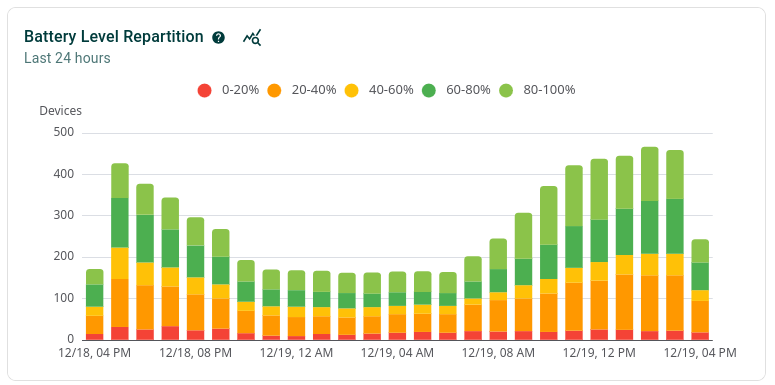
- New Battery charts: The existing battery charts were replaced with two much more useful ones. One chart lives in your dashboards, listing the battery level repartition of devices through time (in order to determine whether you have to adjust your battery management rules to avoid low availability of your devices at key moments of your day).
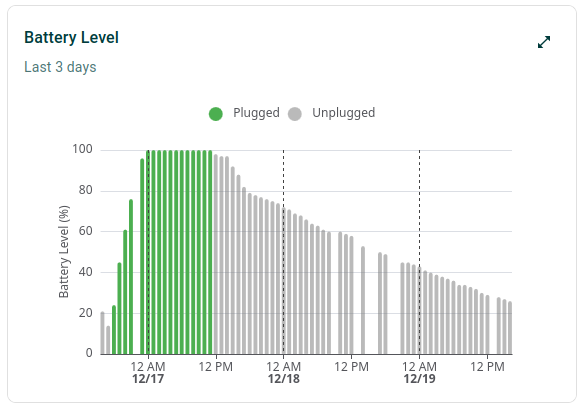
The second one lives in the side-panel of your devices in the Discover page, and shows how the battery of particular devices has evolved through time.
OS Actions
Famoco now gives you access to advanced features you can set on your profiles, accessible in the OS Actions section.
Push Notifications message reception time
Push Notifications used to require devices to be connected at the time of the message being sent. Now, devices will have a 24 hours window to connect to the internet and receive the notification. In a future release, this limit will be modifiable.
MDM 3.3 (October 2025)
Famoco Connect data consumption charts
You may now track the data consumption of your devices if they are using Famoco Connect.
For more information about Famoco Connect, please check its dedicated page and the page detailing the integrations in the MDM.
Reusable paths
Ever wanted to share your findings in the MDM data tables with someone else? It is now possible, as any filter or ordering you apply on them will now be displayed in the URL, allowing you to share that URL with other users in your organization to allow them to get the same results.
"Select from file" using Custom IDs and IMEIs
Selecting devices on the MDM's Devices table using a file was possible when using Famoco IDs as a reference. We've heard your feedback: IMEIs and Custom IDs are now usable too!
MDM 3.2 (August 2025)
New device side-panel
The devices side-panel was getting cluttered, and it was complicated to get all the information needed. That's why we made it even bigger!
Now you still have the primary information about your device when clicking on its row, but if you click on "View All Device Details" you will find everything you need to know about your device!
New application management tool
Application management was considered a bit too tricky. We've redesigned it entirely to be more user-friendly. Please check our brand new Guide in order to understand how it works.
Major upgrade on permission handling
We have entirely reworked all the management of permissions inside our different services and features. You can now create custom roles and API access tokens with many specific permissions.
Each MDM page listed on this Help Website (see the quick start page for the full list) now has one or more "Permissions" call-outs (see example below), which when clicked on allow you to understand the impact of each permission found in the Custom Roles or API tokens.
Example:
Permissions (CLICK ME)
Some text explaining the permissions for the section you are reading.
User Experience improvements
- Table column re-ordering: You may now re-order columns by highlighting the desired column, finding the icon, and using a drag-and-drop mechanic to set the column at the desired position.
- Easy access to actions in the side-panels (on all menus)
Other
- Device Labels are now exportable fields
- You may now pick whether you want OTA upgrades to function when using roaming mobile data
- Apps now display a default image instead of a broken one if app does not include an logo
- ICCID and IMSI data are now displayed on the device side-panel if it has a SIM card inside it
- Many bugfixes!
MDM 3.1 (May 2025)
New Dashboards
-
The MDM dashboard has been completely revamped and includes a lot more information now.
-
The new Insights dashboard format allows users to have multiple dashboards, share them, and manage permissions with other users in your MDM organization.
Please check the Help Website sections linked above for a complete explanation and screenshots.
User Experience improvements
- Get in-app tutorials about MDM features
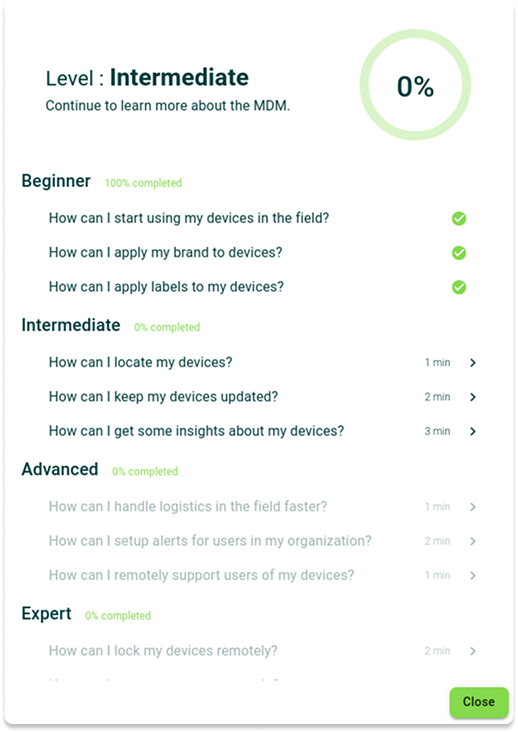
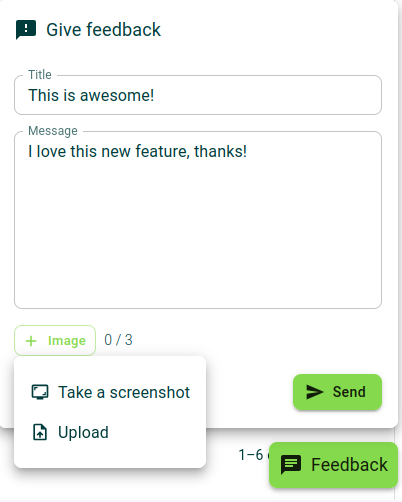
- Give feedback, report bugs or request features through the MDM
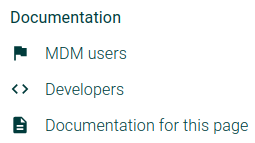
- Link to Help website pages on each MDM section, via the top bar
- Users joining a brand new MDM organization will get some help when they reach empty pages
New Alerts

Subscribe to these new MDM Alerts
- Weekly digest of excessive charge duration
- Share of non-reporting devices
- Monthly increase of non-reporting devices
Insights API
Insights data is now readable via new API tokens
MDM 3.0 (March 2025)
- UI: Complete rework of the User Interface.
- Insights: Network data and charts.
- Alerting: Network alerts and Geoalerts.
- Profiles: Added hidden SSID Network option.
MDM 2.27 (December 2024)
- App Store feature.
- Improvements to the App Config feature.
- Added a toolbox to Insights charts.
MDM 2.26 (October 2024)
- Allow some third-party devices to register themselves into the MDM.
- Lock/Unlock devices remotely.
- Display SIM Lock feature data on device side panels.
- New QR Code format in Action Tokens, readable by the devices themselves instead of using NFC cards.
MDM 2.25 (June 2024)
- Broadcast messages to devices.
- New designs for the dashboard and side panels.
- Insights: several improvements to graphs displaying activity data.
MDM 2.24 (May 2024)
- New feature: an alerting menu enables the creation of alerts based on various criteria with a configurable trigger threshold. Alerts can be configured to be received on channels such as email and MDM notifications.
- Internationalization: the platform now supports English and French. Language setting is based on browser language but can be changed in the UI.
MDM 2.23 (March 2024)
- Improvements to Insights
- The design of the charts has been revamped, making them more usable and readable.
- Time ranges in charts are now more flexible and intuitive to use.
- "No data" results are now hidden by default.
- You may now see more than 3 top apps by changing a filter on the corresponding chart.
- Charts are now exportable as an image in a single mouse click.
- Dark Theme: This color scheme allows you to see the MDM in a brand new way.
MDM 2.22 (December 2023)
- Insights: A new section in the MDM with actionable insights related to your devices.
- Device Health: Monitor the health of your batteries (battery health indicator, battery heating events, battery level, battery plugged status).
- Device Activity: Discover and monitor your device activity (activity status, activity duration, activity sessions, top 3 apps used).
- Random MAC address: Increase the privacy of your device with WiFi randomized MAC address.
MDM 2.21 (August 2023)
- Contextual help: Advanced & new features are now supported with in-depth guidance & visuals labels.
- Revamped UI: Perform actions on devices through a more intuitive and consistent user interface.
- Labels-based Segmentation: Use Labels to create a new segmentation to categorize, filter and sort your devices.
- Sync Now: Force a device synchronization remotely.
- Reboot Now: Reboot a device remotely.
MDM 2.20 (May 2023)
- Software Update Policy : new feature : ability to update OS and Famoco Layer (MDM agent) separately
- Battery information : new indicators available Battery level and Battery status via Device section
- API Access Token : enhancement of information display with a new field Creation date
MDM 2.19 (February 2023)
- Internal release modifying the Billing mechanism of the MDM.
MDM 2.18 (November 2022)
- New menu and feature: Look & Feel / Branding of the Famoco Layer (requires Famoco layer version 3.9.1 or above)
- New feature: notifications allowing Famoco to inform the MDM users of upcoming releases
- New profile feature: allow users to set a rule so APK downloads are done only through Wifi/Ethernet, and not through Mobile Data (requires Famoco layer version 3.9.1 or above)
- New and improved export mechanism
- UI improvements in the Maps menu
- Improved overall stability of the platform
- Many bugfixes and minor features
MDM 2.17 (May 2022)
- Improved the whitelists feature
- Added mechanism to add or remove multiple applications at one time from Profiles
- Added feature to request a device reboot at next sync
- Improved overall stability of the platform
- Many bugfixes and minor features
MDM 2.16 (December 2021)
- Fleet Scoped Roles
- Commercial Name
- Whitelists form back to the profile menu
- Additional information for devices which have labels
- Add filter for device notes
- Add dashboard permission to custom role permissions
- Other
- Performance improvements
- API improvements
- Dead code cleaning
- Miscellaneous small fixes
MDM 2.15 (August 2021)
- New Famoco Layer
- Warranty Date Display
- NTP Servers Configuration
- Geofencing V1
MDM 2.14 (May 2021)
- Application Essentials
- Device Controlled Connectivity
- Software Update status
MDM 2.13 (March 2021)
- Device Remote Access from MDM (beta)
- Software Update action logs
- Sync status refresh fix
MDM 2.12 (February 2021)
- Famoco Device Software Updater
- User interface
- Map fixes
Device Software Update requires an initial Famoco Layer setup with v2.33 or above.
MDM 2.11 (November 2020)
- Device Sync Audit Log
- Famoco Layer Version
- Extended Application Search in Profile Modal
- User Login and Organizations List in My Profile
MDM 2.10 (September 2020)
- Device Labels
- History
- Sync Frequency Options Update
- Applications Upload and Multiselection
MDM 2.9 (June 2020)
- Custom Identification
- NFC Android Beam
- Network Location Map Rendering
- Sync Frequency Option Update
MDM 2.8 (May 2020)
- Regular Devices GPS/Network Location Processing
- New Location IP Estimate Text Rendering
MDM 2.7 (April 2020)
- Device Location GPS Persistency with Date and Accuracy
- Proper API Error Messages
MDM 2.6 (March 2020)
- Application File Delivery Optimizations
- Improved SSL Sessions for Devices Sync
- Network Time Protocol Over FMS
- Dashboard Connectivity Check
MDM 2.5 (February 2020)
- Devices Notes
- Custom Roles
- Profiles List
- Persistent Filter Settings
- Improved and New Maps Tools
- Other Devices List Upgrades
- Clickable Locker Icon
MDM 2.4 (November 2019)
- App Whitelist
- Actions History
- Members, Action Tokens and API Access List
- Old Interface Shutdown
MDM 2.3 (July 2019)
- Applications File Max Size Increased to 300MB
MDM 2.2 (June 2019)
- Password Strength Meter
- Main Menu and Dashboard New Layouts
- Devices, Fleets and Applications Lists
- Device Side Panel